
I’m sure you’ve used Google’s search engine or Google Maps several times to look for a business. In the same way, so have your customers.
Google My Business is a free tool from Google that allows you to give your business more prominence in Google’s search results by creating a company page.
Once the page has been created, and depending on the search term used and the user’s location, your company or business will be displayed on Google’s search engine or on Google Maps.
Creating an account on Google My Business:

1 – Company name and business category
It’s important that the business category is well defined and that you also know your Persona.
2 – Location
When it comes to a physical business, the address is fundamental, so that it can be easily found by your customers.
3 – Contact information
In addition to the telephone number, which is essential for your customers to contact you, Google also asks you to enter the URL (Uniform Resource Locator) of your website. If you don’t have a website, Google will provide you with a free one based on your information.
4 – Services
Select the services your company offers to reach the right customers.
5 – Schedules
Make sure your customers are always up to date with your timetable. You also have the option of adding special times for specific dates.
6 – Company description
Write a detailed description of your company, highlighting its strengths. The more detailed the description, the more your potential customers will be able to find your business.
7 -Photographs
Google My Business gives you the option of adding your company logo, cover photo, photos of your products, the interior of the space and the exterior of your store.
8 – Publications
This platform allows you to create publications to announce an event, an offer, an update or a new product.
But what advantages does Google My Business bring to a business?
Dissemination and reach
A presence on Google My Business is an excellent way to publicize and increase the reach of your business without the need for a large investment.
Not only are you promoting it to everyone with access to the Internet, but more importantly, you are promoting it to those who are looking for your service or product.
For example, anyone, wherever they are in the world, who searches for “Bar Porto” will have access to bars located in Porto.

SEO
A business on Google My Business increases the indexing of your site in search engines, thus improving the ranking of your site SEO without needing to know about it.
The search results will appear taking into account the proximity, relevance and quality of customer reviews.
One important thing to remember is that most people don’t go beyond the first page of a Google search, which makes it extremely important for your business to be on the first page.
Advantage over the competition
Consumers are increasingly looking for services and products on the Internet. When they search, if your competitors don’t have an account on this platform, there is a greater chance that your business will be chosen, giving you an advantage over the competition.
Interaction with customers
It’s not enough to create an account on this platform, it’s essential to nurture interaction with customers, whether it’s responding to positive or negative comments. According to a study by Bright Local, 97% of consumers who read comments also read companies’ replies.
Statistics
Google My Business gives you access to various statistics such as:
- Where customers find the company: whether through the search engine or an indirect search;
- Traffic: amount of traffic generated to the website
- Geographical analysis: it is important to understand the geographical location of your customers.
- Customer actions: directions and contact. Analyze the number of phone calls you receive and see if you can answer them all.
- Photos: views and number of photos published;
- Customer feedback: reviews and recognized features of the business made explicit in the comments
How to optimize your Google My Business page?
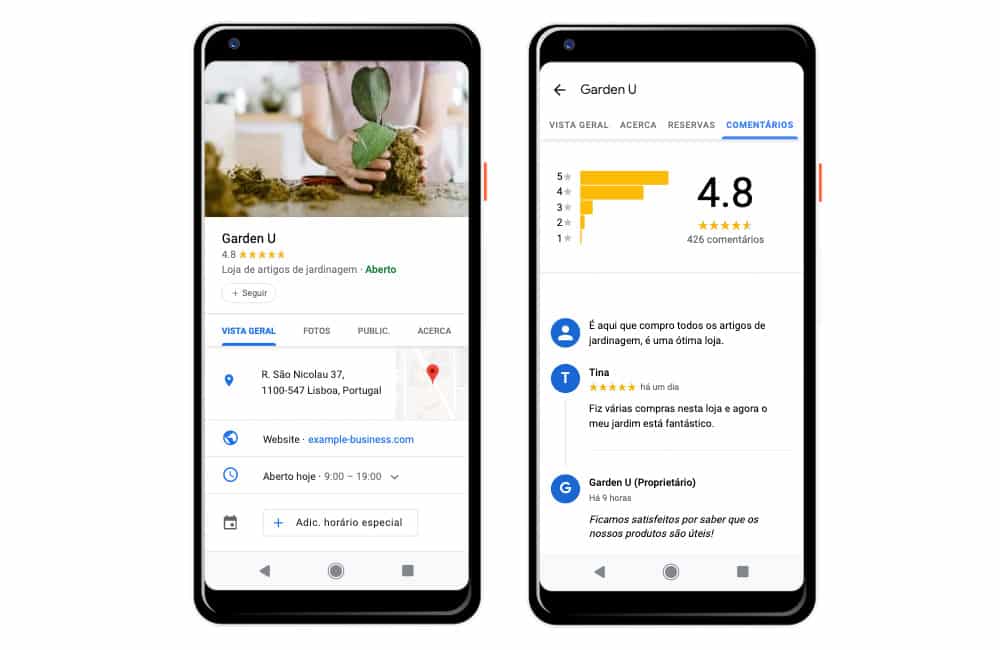
1 – Always keep your information up to date
Make sure your data is up to date so that consumers can contact you, ask questions or schedule some kind of service.
The more information your potential customers have, the easier it will be for them to get the answer they need and then make their decision.
2 – Create a clear description of your brand
Google My Business allows you to create a description of up to 750 characters. Use this space to inform your potential customers about what your company offers and how it differs from the competition.
3 – Encourage your customers to interact
It’s important to encourage your customers to evaluate your business; these recommendations are essential for reducing the risk associated with a potential customer’s purchase.
The evaluations that customers make on their Google My Business profile have an impact on the positioning of the business in search results with local intent.
4 – Crie publications
Since 2017, Google My Business has allowed companies and consumers to publish and share content.
You should therefore take advantage of this feature to create content that adds value to your business:
- Publicizing offers and promotions;
- Add your company’s events;
- Add new products;
- Alert them to news about your company or your field.
Publishing regularly is a way of keeping your potential customers up to date and reminding them that your brand exists.
Once you’ve found out how to create a Google My Business account and all its advantages, it’s time to create your own. Take advantage of this free platform! If you want, you can also log on to contact!


