
Have you ever felt that creating presentations, documents or even websites takes up more time than your own creativity? And have you ever wished you could ignore the boring parts of design and just concentrate on your ideas? If so, this article is worth a read!
With a tool like Gamma, getting from idea to final result has never been so intuitive, fast and efficient. From corporate presentations to interactive websites, this platform simplifies the creative process without compromising customization.
What is Gamma?
Gamma is a platform based on artificial intelligence that supports the creation and organization of digital content in different formats. Designed to meet the diverse needs of users looking for agility and professionals who value efficiency, it also includes functions that allow information to be structured and converted into coherent visual and editorial pieces.
Its main features include: creating presentations from text, transforming notes into structured documents (such as reports or case studies), developing content for social networks in multiple formats and building simple websites.
Using AI models, the platform interprets the information provided and organizes it clearly, adapting it to the desired format. Its focus is on simplifying processes and systematizing content, contributing to more agile production in a digital context.
How to use Gamma?
Create account and integration
First, simply go to gamma.appselect “get started for free”, confirm your e-mail address and you will be directed to the control panel.
Navigating the control panel
The control panel acts as Gamma’s command center. Here’s an overview of what you’ll find:
| Section | Purpose | Key actions |
| All Gammas | View/manage projects | Filter by all/ favorites/ created by you/ frequently visited and you can switch between grid and list views. |
| Folders | Organizing content | You can create, drag and drop and manage several folders. |
| Models | Explore layouts | Finds AI-optimized structures. |
| Library | Choosing themes | Access colors, fonts and gamma design. |
| Garbage | Recovering items | You can restore or permanently delete content. |
| Settings | Administrator controls | You can manage functions/permissions. |
Depending on what you plan to create, you can choose from several modes. If you want to:
- Generate: Enter a prompt (for example, “Sustainable fashion trends”) and Gamma automatically creates the structure of the project. You can also use the advanced mode to define specific details, such as the tone, length or target audience.
- Necklace: Copy text from notes, an outline or existing content. AI automatically organizes and formats the information into structured, visually appealing layouts.
- Create from a template: Start with a predefined structure, explore the various templates available in Gamma and customize them in terms of text and design according to your needs.
- Importupload a file, such as PowerPoint or PDF, or import directly from Google Drive or a URL (such as a web page). Gamma converts the content into something enhanced, according to the prompt provided.
You can also choose to start from scratch. In the “New Gamma” option in the control panel, you can define whether you want to create a presentation, a document, content for social networks or a website page.
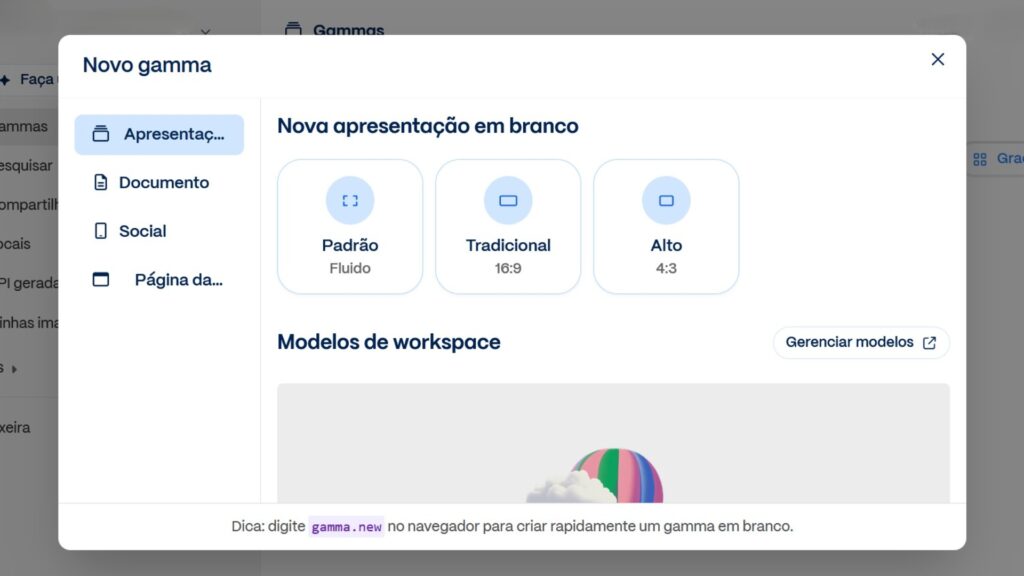
An interesting point about Gamma is that it uses “cards” to organize the content. These are similar to slides, pages or sections, but without the traditional limitations. They automatically adjust to the content, and you can expand or reduce them as you wish.
And each card is made up of editable blocks. These blocks can include text, images, videos, diagrams or other visual elements. Simply click on any area to edit and customize, shaping the project exactly to your style and purpose.
How do we apply Gamma in our agency?
Got interested >>> Learn more about this tool
In practice, Gamma has become a true strategic partner, helping us save time, streamline processes, and improve the quality of our work. The platform allows us to focus our creativity on what really matters, while the AI handles the most repetitive and routine tasks, such as:
- Improve presentations: we use Gamma to transform our presentations into more visually appealing and impactful content, quickly.
- Brainstorming: we enter a topic and Gamma suggests titles, subtitles, content and visual elements, which is relevant for energizing team meetings and unlocking new concepts.
- Strategy papers and proposals: we transform briefingsnotes and loose ideas into structured documents. Gamma helps us organize information clearly, creating ready-made proposals.
Gamma reduces the time spent on repetitive tasks, boosts creativity and maintains visual consistency. In this way, it allows the team to focus on the essentials: telling stories, creating experiences and impressing customers.
If you haven’t tried it yetnow is the perfect time to let Gamma make your way of working easier.